bd10 App: APK Download for Android
One file, 36 MB, free to install. The bd10 app runs on Android 6.0 and newer and signs you into the same account you already use on the website, with the same balance, bonuses and bet history.
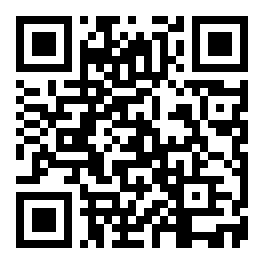
Reading this on a laptop? The QR code in the download box below moves the same file to your phone without typing a link.
Download bd10 App for Android
Tap the button, wait for the file to finish saving, then open it from your Downloads folder. No Play Store account is needed, and the install takes less than a minute on a normal connection.
- Version 3.6.4, 36 MB, free to download
- Runs on Android 6.0 and newer
- Menu in English and Bangla
- Same login as the website, no new account
File: bd10.apk · 36 MB · updated 10 November 2026
Version and file details
| Version | 3.6.4 |
|---|---|
| File size | 36 MB |
| Minimum Android | Android 6.0 |
| Last updated | 10 November 2026 |
| Price | Free |
| Languages | English and Bangla |
Before you tap install
Keep at least 36 MB free so Android can unpack the package. If your phone shows less than that, clear old photos or move them to a memory card first.
Already have a bd10 account? The app opens on the login screen and remembers your user name after the first sign-in.
Install the app on Android in five steps
The only part that confuses most players is the unknown sources switch in step one. Android asks for it once, then remembers your choice.
-
1
Allow unknown sources
Open Settings, then Apps, then Special access, then Install unknown apps. Choose the browser you download with, such as Chrome, and switch the option on. This setting only applies to that one app.
-
2
Download the file
Come back to this page and tap Download APK. The file bd10.apk lands in your Downloads folder. Stay on Wi-Fi if your data pack is small, and keep the screen awake until the save bar finishes.
-
3
Open and install
Pull down the notification shade and tap the finished download, or open your file manager and tap bd10.apk. Read the permission list on the install screen, then confirm. Unpacking takes a few seconds.
-
4
Sign in to your account
Enter the phone number or user name you use on the website, then your password. New to bd10? Create an account in a couple of minutes and check the first deposit offer before you place a bet.
-
5
Test one small action
Open the cashier and confirm your saved bKash or Nagad number is correct, then place a small bet on any market. If both work, the app is set up properly and you can remove the APK file from storage.
iPhone and iPad: add bd10 to the home screen
There is no iOS app file. Apple phones use the mobile site in Safari, saved as a shortcut so it opens full screen without the address bar.
- Open Safari and load bd10.team. Other browsers on iOS cannot save the shortcut.
- Tap the Share button in the toolbar, then scroll the list of actions.
- Choose Add to Home Screen, rename it to bd10 if you like, and tap Add.
- Open it from the home screen and sign in once. Safari keeps you logged in after that.
Is the APK safe to install?
Yes, as long as the file comes from this page. Everything else is a habit question: what you check before tapping install, and which permissions you refuse.
Download only from this page
The bd10.apk here is the build we publish, and each release is signed so Android can detect a modified package. Files shared in Facebook groups, Telegram channels or third-party mirror sites may be repacked with extra code, so skip them even if the file name looks correct.
Read the install screen
Android lists the app name, version and permissions before you confirm. A betting app has no reason to read your contacts, send SMS or open the camera. If a package asks for those, cancel the install and delete the file instead of continuing.
What the app actually needs
Storage, so game images and banners stay cached between sessions. Network access, for odds, live tables and the cashier. Notifications, for settled bets and bonus alerts, which you can switch off in phone settings at any time without breaking the app.
Your PIN never leaves the cashier
Deposits and withdrawals run through the cashier page using bKash, Nagad, Rocket, Upay or bank transfer. No member of staff will ask for your mobile wallet PIN in a chat window or a phone call. If someone does, stop the conversation and report it.
What you actually use in the bd10 app
Six parts of the app that people open every day, from a quick cricket bet to a deposit before the evening match.
Cricket and football in one slip
The sports screen opens on matches playing today, with BPL, international cricket and European football in the same list. Tap a price, set your stake in taka, and the slip stays on screen while you check other markets.
Slots that fit the screen
Pragmatic Play, PG Soft, CQ9, Habanero and KA Gaming titles load in portrait, so you can spin with one thumb. Tiles open in a few seconds, and the lobby remembers the last game you played.
Crash rounds with a clear cash-out
Instant games and crash rounds have their own tab and a large cash-out button near the bottom edge. That placement matters on a crowded bus, when you need to take a multiplier quickly, one handed.
Cashier with your saved method
Deposits reach your balance in about 6 minutes and withdrawals in about 7. The cashier remembers whether you used bKash, Nagad, Rocket or Upay last time, so a repeat deposit takes three taps.
Built for patchy connections
Odds refresh over a light connection instead of reloading the whole page, which helps on mobile data indoors. Live casino streams switch to a smaller window when the signal drops, and the betting grid stays usable.
Alerts you can switch off
Bet settlements, bonus credits and version notices arrive as notifications. Mute them from the phone settings, or turn on only the ones you care about. The app keeps working with every alert disabled.
Play cricket markets, slots and live tables in one lobby

The lobby is split into sports, live casino, slots, fishing and instant games. Everything runs inside the app, so you do not need a second browser tab or a separate account.
Fishing titles such as Pirate Fishing and Dragon Fishing suit players who like a fixed budget per round. Roulette and card tables stream from live dealers, with the betting grid under the video.
The full lobby list, including RTP and bet limits, sits on the bd10 casino page.


Will bd10 App run on your phone?
Most Android phones sold in Bangladesh in the last few years handle the app without trouble. The checks below take ten seconds.
- Android 6.0 or newer, which you can confirm in Settings then About phone
- 36 MB free for the download file, plus a little room for the installed copy
- No Play Store account, no subscription and no monthly charge
- English and Bangla menus, switchable inside the app
- A bd10 account, which you can create free in a couple of minutes
On a phone older than Android 6.0, skip the APK and use the mobile website. Bets, cashier and live tables all work there, and you keep the same login. If you have not registered yet, the registration page walks through the phone number and password steps.
Compare the app with the mobile browser
Both routes reach the same account and the same balance. The difference shows up in daily habits: data use, speed on weak signal, and how quickly the cashier opens. If you are already registered, the bd10 login page works inside either one.
| What you need | bd10 App | Mobile browser |
|---|---|---|
| Getting started | One 36 MB download, then open it from the home screen | Type the address each time, or save a bookmark |
| Data use | Lower after install, because images and menus are cached | Higher, since the full page loads again on each visit |
| Speed on weak signal | Odds refresh on their own, no page reload | Depends on the browser and the network |
| Live casino | Stream resizes inside the app window | Stream opens in a browser tab |
| Cashier | bKash, Nagad, Rocket, Upay and bank transfer | The same methods and the same limits |
| Updates | Download the new file from this page, or follow the in-app prompt | Nothing to update, the site is always current |
| Storage used | 36 MB plus cached images | Almost nothing beyond browser data |
| Best for | Daily betting on your own phone | Trying the site on a borrowed phone, or an old device |
Fix a download that will not finish
Five problems cover almost every failed bd10 app install. Match the message on your screen to the table, then follow the fix in the last column.
| What you see | Why it happens | What to do |
|---|---|---|
| Install blocked, or the file will not open | Install unknown apps is still off for your browser | Settings, Apps, Special access, Install unknown apps, pick your browser, switch it on. Then tap the file again. |
| Download stops partway or the file looks too small | The connection dropped before 36 MB finished saving | Delete the partial file, free some storage, and download bd10.apk again on Wi-Fi. Check the size reads 36 MB. |
| App not installed | An older or differently signed copy of bd10 sits on the phone | Uninstall the old app, restart the phone, then install the fresh file. Your account stays on the server. |
| Login takes forever, or the lobby stays empty | Weak signal, or a VPN routing traffic the wrong way | Switch the VPN off, try mobile data instead of Wi-Fi, and reload. If it still stalls, use the mobile site for that session. |
| A banner asks you to update again every launch | The installed build is older than 3.6.4 | Download the current file from this page and install it over the old one. Do not update from a link sent in a chat. |
Still stuck? Open live chat, available 24/7, and send the exact error text plus your phone model. That saves a round of questions. Withdrawals and account checks are handled separately on the withdrawal and KYC guide.
Scan the code or save the file, both install the same build
Two ways to move bd10 onto an Android handset. If you are reading this on a phone already, tap the button and the browser saves the package to your Downloads folder. If the phone is in your hand and the screen in front of you is a laptop, point the phone camera at the code and open the link it reads.
- One file, 36 MB, free to download and free to keep updated.
- Built for Android 6.0 and newer, so older bKash-era handsets still run it.
- Signs in with the account you already use on the website, with the same balance and bonus status.
- 24/7 live chat opens inside the app, in case a deposit or a withdrawal needs a human.
Point your phone camera here to open the file on the handset.
File: bd10.apk · 36 MB · version 3.6.4
Install questions, answered
The seven things players ask most before, during and after installing the bd10 app.